Showing posts with label OpenBSD. Show all posts
Showing posts with label OpenBSD. Show all posts
Sunday, March 27, 2011


Saturday, March 13, 2010
Marc Espie on portability
Marc Espie on portability: "
A short while ago, Marc Espie (espie@) wrote to the ports mailinglist with a short rant about autoconf. His mail gives good insights into the problems porters face when dealing with GNU software, especially those using autoconf."
A short while ago, Marc Espie (espie@) wrote to the ports mailinglist with a short rant about autoconf. His mail gives good insights into the problems porters face when dealing with GNU software, especially those using autoconf."
This actually describes one of the many reasons I despise working a lot of other 'programmers' in this world, many of whom exhibit even greater levels of brain injury then that post takes as examples.
In my not so humble opinion: GNU autotools is either a good idea gone horrible wrong (in practice), or a royal brain fuck that just got out of hand. Users who can use such tools properly, seem to be falling by attrition to younger developers, many of whom (in my experinces anyway) wouldn't know portability if it strung them on the keester like sitting on a scorpion. The GNU build system can an extremely good tool chain to work with, or it can be your worst freaking nightmare; a lot of people just don't seem to care any more. My policy has always been, to support what I use (BSD/Win), and trying to minimise the heartache of getting code built on another platform.
Although the GNU project is perhaps the largest distributor of infectious disease on the Internet, I blame the developer idiocy I see around me, on the youth and not on the software. Most "Old wizards" seem to actually know their tools.....
Mario: Treat your tools like a friend. Keep 'em by you. Never let 'em down, and they're always at your side.
Luigi: Hey, Mario, how is it that for every situation that could possibly come up, you always got a saying about tools?
Mario: I got 'em from Papa.
Both: He got 'em from Grandpapa!
Thursday, July 30, 2009
Haha, believe it or not but I just upgraded my file server from OpenBSD 4.4 Release to OpenBSD 4.5 Release, lol. Usually I'm pretty good about keeping my systems up to date, but lately life has just been to troublesome to care about it :-/.
In a change, I've also elected this time to install the various X related dist sets in the upgrade; I have no need to run GUI tools to manage my file server, but I have been thinking of using the machine to supplement my laptop, by way of running an X-Server on the desktop machine, and employing SSH for an extra layer of encryption.
Although I have never had need of (nor desire to try) the OpenBSD ports system, it does require X if memory serves, so probably good to have it available. Since the box isn't setup for running an X server it is only filling free diskspace, and that box is well partitioned hehe.
In a change, I've also elected this time to install the various X related dist sets in the upgrade; I have no need to run GUI tools to manage my file server, but I have been thinking of using the machine to supplement my laptop, by way of running an X-Server on the desktop machine, and employing SSH for an extra layer of encryption.
Although I have never had need of (nor desire to try) the OpenBSD ports system, it does require X if memory serves, so probably good to have it available. Since the box isn't setup for running an X server it is only filling free diskspace, and that box is well partitioned hehe.
Tuesday, April 14, 2009
14 months from purchase to setup?
Not so long ago a thread came up on DF, dealing with printing. That reminded me.... I baught my printer in what, February of 2007 and it's just been gathering dust?
That's gotta be a new record: for either laziness or being to fsckin' busy lol.
The reason I bought it, I knew this model was usable with most OSes. Honestly, I _hate_ ink jet printers (and printers in general, but yeah... especially ink jets). Sadly, a decent PostScript printer is harder to find in this place then an affordable laser printer; having to use an inkjet makes me very happy that I rarely print anything.
Around OpenBSD 4.3 or so, I stripped off all printing related packages off my server: the shitmark hasn't worked in years. So I had to setup the format filtering magic anew: ghostscript (no_x11 flavour), hpijs, foomatic-filters, and foomatic-db-hpijs. Several years ago it was my intention to run a networked printer off the box, but the printer I had at the time more or less stopped functioning under FreeBSD+CUPS, so I haven't paid much attention since then. Most distributions use the Common Unix Print System (CUPS) these days; but I'm just old at heart, I like the Berkeley Line Printer Daemon (lpd). CUPS, only way I ever know wth is going on is going cross eyed with log files; with lpd, at least you know it's brainlessly simple to sort out.
My only complaint about the printer, 'lptest | lpr' resulted in 2 pages of ~60 lines before I decided to dequeue the 200 line job: and the some-bitch isn't smart enough to eject the darn 3rd sheet of paper ^_^. (whether this has to do with my PPD file or hpijs support for my printer is not interesting to me, lol). On top of that, the thing prints about as slow as I can write text by hand. I could just imagine if I fed tpsh's ~3000 lines of text though it, probably take a week and 50 sheets of paper.
That's gotta be a new record: for either laziness or being to fsckin' busy lol.
The reason I bought it, I knew this model was usable with most OSes. Honestly, I _hate_ ink jet printers (and printers in general, but yeah... especially ink jets). Sadly, a decent PostScript printer is harder to find in this place then an affordable laser printer; having to use an inkjet makes me very happy that I rarely print anything.
Around OpenBSD 4.3 or so, I stripped off all printing related packages off my server: the shitmark hasn't worked in years. So I had to setup the format filtering magic anew: ghostscript (no_x11 flavour), hpijs, foomatic-filters, and foomatic-db-hpijs. Several years ago it was my intention to run a networked printer off the box, but the printer I had at the time more or less stopped functioning under FreeBSD+CUPS, so I haven't paid much attention since then. Most distributions use the Common Unix Print System (CUPS) these days; but I'm just old at heart, I like the Berkeley Line Printer Daemon (lpd). CUPS, only way I ever know wth is going on is going cross eyed with log files; with lpd, at least you know it's brainlessly simple to sort out.
My only complaint about the printer, 'lptest | lpr' resulted in 2 pages of ~60 lines before I decided to dequeue the 200 line job: and the some-bitch isn't smart enough to eject the darn 3rd sheet of paper ^_^. (whether this has to do with my PPD file or hpijs support for my printer is not interesting to me, lol). On top of that, the thing prints about as slow as I can write text by hand. I could just imagine if I fed tpsh's ~3000 lines of text though it, probably take a week and 50 sheets of paper.
Saturday, November 15, 2008
Strange behavior with this bit of C++
It has been a long time since I've had time to do anything in C++. So I figured it would be a useful way to limber up my memory, by implementing a little bit of my favorite Python classes/modules in C++. The only crazy thing, is the result this code has yielded.
compilation: /usr/bin/g++ -Wall -ggdb3 os.cpp test.cpp -o test
I compiled on FreeBSD 7 with the systems GCC 4.3.1 and get a segfault, then tried the code on my OpenBSD 4.4 machine. The OpenBSD 4.4 release has shipped with a patched GCC 3.5.3 (propolice) - on OpenBSD it ran perfectly! Trying to feed it through the debuger on FreeBSD wasn't pretty either:
If I change os::link to os::link_x and recompile on FreeBSD, it works the same as it does on OpenBSD, when unmodified that is. In a few tests on FreeBSD, When I run the program under GCC, it tells me
if I set a break point in test.cpp on the os::link() call, and step through it into os::link() in os.cpp. If I keep stepping after the link(), I get returned to the os::link() call in main and can step through it all again. Like an endless loop of stepping into/out of the os::link() function call in test.cpp's main(), and the if-conditional in os.cpp's os::link(), geeze.
At least looking at the results I've had tonight, I know I'm not freaking nuts... lol. I still shouldn't write code when I'm half asleep, but hey... It's the only time I get :\, Oh well... unless my family is late as usual, I need to be up in a few hour.
*head hits laptop, snores loudly until morning*
// minimal program, using the code involved #include#include extern "C" { #include <sys/param.h> #include <unistd.h> } namespace os { bool link(const std::string& src, const std::string& dst); } bool os::link(const std::string& src, const std::string& dst) { if (link(src.c_str(), dst.c_str()) != 0) { std::perror(NULL); return false; } return true; } int main() { std::cout << "link()\t" << std::endl; os::link(std::string("./test"), std::string("/tmp/test")); return 0; }
compilation: /usr/bin/g++ -Wall -ggdb3 os.cpp test.cpp -o test
I compiled on FreeBSD 7 with the systems GCC 4.3.1 and get a segfault, then tried the code on my OpenBSD 4.4 machine. The OpenBSD 4.4 release has shipped with a patched GCC 3.5.3 (propolice) - on OpenBSD it ran perfectly! Trying to feed it through the debuger on FreeBSD wasn't pretty either:
- FreeBSD 7, system GCC 4.3.1 -> test program dies with a Segmentation Fault.
- FreeBSD 7, system GDB 6.1.1 -> Endless stepping when used with a break point, or SIG SEGV in libc's malloc() when run.
- OpenBSD 4.4, system GCC 3.5.3 -> prints proper message from std::perror() as expected, when the program is executed.
If I change os::link to os::link_x and recompile on FreeBSD, it works the same as it does on OpenBSD, when unmodified that is. In a few tests on FreeBSD, When I run the program under GCC, it tells me
Program received signal SIGSEGV, Segmentation fault.
0x281fabc3 in malloc () from /lib/libc.so.7
if I set a break point in test.cpp on the os::link() call, and step through it into os::link() in os.cpp. If I keep stepping after the link(), I get returned to the os::link() call in main and can step through it all again. Like an endless loop of stepping into/out of the os::link() function call in test.cpp's main(), and the if-conditional in os.cpp's os::link(), geeze.
At least looking at the results I've had tonight, I know I'm not freaking nuts... lol. I still shouldn't write code when I'm half asleep, but hey... It's the only time I get :\, Oh well... unless my family is late as usual, I need to be up in a few hour.
*head hits laptop, snores loudly until morning*
Saturday, November 8, 2008
running off the deepend
Well, finished one portion of my docs (Grrr... wasting time in #kde-chat and #vim lol); even got one of the manual pages written out.
Ya know, with the mdoc.samples(7) and mdoc(7) manual pages + a few simple manual pages for reference (head, cat, pkg_add) the process of writing a manual page is actually much less painful then I remember it being. I've only got one small problem so far, thin I'll post on daemonforums later and see if anyone has an idea; if not I'll probably have to adjust the man pages wording a lit' bit.
nroff/troff is also strangely addicting once you start playing with macro packages...
Ya know, with the mdoc.samples(7) and mdoc(7) manual pages + a few simple manual pages for reference (head, cat, pkg_add) the process of writing a manual page is actually much less painful then I remember it being. I've only got one small problem so far, thin I'll post on daemonforums later and see if anyone has an idea; if not I'll probably have to adjust the man pages wording a lit' bit.
nroff/troff is also strangely addicting once you start playing with macro packages...
Sunday, October 26, 2008
Muahuaha !!! I love this thing.
$ vim pf.conf.new
 ... write new packet filter configuration file
$ pfctl -nf pf.conf.new
  ... silent output if no errors
$ su - root
Password:
# cd /etc
# mv pf.conf pf.conf.old
# cp /home/Terry/pf.conf.new /etc/pf.conf && rm /home/Terry/pf.conf.new
# chmod 644 pf.conf && chown root:wheel pf.conf
# echo 'pfctl -F all -d' | at hhmm
  ... unlock the door if we screw up
# pfctl -e
enabling or disabling the packet filter (-e, -d) kills the SSH connection, but in the event of any embarrassing "oh crap, I've locked myself out" accidents, the at job will flush the firewalls settings and disable it. Believe me, if you've got a system running with no head or physical inputs (e.g. no monitor, no keyboard), ya really want to use such a thing... I still remember coming home from a *very* bad day at work, working on my rule sets, and locking myself out 5 times, and having to hook up a monitor and keyboard to the server each time >_>.
What wonders you can learn from one bad day, huh?
At least tonight, I've not locked myself out once... despite the days troubles, hehe. One of the reasons I like OpenBSDs packet filter, it's simple, it's powerful, just read the fine manual, use your gray matter, and it works! The rule sets are fairly easy to read, and OpenBSD documentation is second to none. Heck the manual page even gives the pf.conf syntax in Backus-Naur Form. The only complex part of pf, is the networking stuff - not the configuration. And of course, I love anything that is configured through a sane text file, rather then having to fire up some cornball program lol. Really, I wish I had the resources to replace my router with an OpenBSD machine, that way I wouldn't have to learn my way around a new web-interface whenever one pops its final cork.
Ahh... At least one good thing happened this weekend!!!
Saturday, June 14, 2008
Wireless networking options
I'm contemplating *trying* to move my desktop PC to my room... Which means access to the 'net will only by available via wireless. The computer doens't have a wirfi card, just ethernet so that means shopping is involved.
It primarily runs Windows XP for gaming and has space reserved for testing GNU/Linux distros and BSD systems. Being a BSD-aware and manual reading shopper, I always crack open my operating systems manuals and look at what cards are supported by the drivers when I go looking for a product.
Since the only principal markets available to me off the web are Best Buy and Office Depot, those are where I looked online first.
The cards:
NETGEAR - 802.11g PCI Card Model: WG311
Pro's:
Supported by ath drivers.
Same brand and chipset as my PCMCIA card (WG511T)
Con's:
Old (or cheap) product, only supports WEP (which I don't use)
Newer revisions may not be totally compatible with existing drivers (I suspect).
Belkin - Wireless-G USB 2.0 Network Adapter, Model: F5D7050
Pro's:
Version 3 is supported by the rum driver and v2000 by the ral driver.
Con's:
Reviews suggest bad gaming performance due to burst based transmissions
The rum driver is new to FreeBSD 7.0-Release (ported from OpenBSD)
GOD only knows what revision/version you might find at the store...
Hawking Technology - Wireless-G USB 2.0 Network Adapter,
Model: HWUG1 at best buy and at OfficeDepot
Pro's:
Supported by the rum
Removable aerial and possibly good signal strength if you don't have problems with it.
Con's:
The rum driver is new to FreeBSD 7.0-Release (ported from OpenBSD)
May be hard to find (lesser known brand, at least from what I've seen of consumer (non enterprise) products).
Just look at Hawking Technologies website... (ugh)
Linksys Wireless-G 802.11g PCI Adapter, Model WMP54G at Office Depot and Best Buy
Pro's:
Supported by the ral driver.
It's cheap
It's available while it is still on the market
It's the same brand as my router (which is _not_ a plus in my book...)
Con's:
More stores are carrying similar but newer models for Wireless-N and variants of the both (802.11g and 802.11g/n) proprietary speed boosting technology, which of course is unsupported.
It's the same brand as my router (which I don't care much for!)
MISC:
Driver support on OpenBSD and FreeBSD at release levels...
ath == OpenBSD 3.7, FreeBSD 5.2, NetBSD 2.0 (more recent modules don't use a binary blob, at least the OpenBSD drivers that is (-;)
ral == OpenBSD 3.7, FreeBSD 6.0 and may require PCI 2.2 compatible mother boards.
rum == OpenBSD 4.0, FreeBSD 7.0
ural == OpenBSD 3.7, FreeBSD 6.0 and may have issues with communicating transmission speed (OBSD manual is more specific).
All of this is posted for my own reference and anyone else who may find use for it.
It primarily runs Windows XP for gaming and has space reserved for testing GNU/Linux distros and BSD systems. Being a BSD-aware and manual reading shopper, I always crack open my operating systems manuals and look at what cards are supported by the drivers when I go looking for a product.
Since the only principal markets available to me off the web are Best Buy and Office Depot, those are where I looked online first.
The cards:
NETGEAR - 802.11g PCI Card Model: WG311
Pro's:
Supported by ath drivers.
Same brand and chipset as my PCMCIA card (WG511T)
Con's:
Old (or cheap) product, only supports WEP (which I don't use)
Newer revisions may not be totally compatible with existing drivers (I suspect).
Belkin - Wireless-G USB 2.0 Network Adapter, Model: F5D7050
Pro's:
Version 3 is supported by the rum driver and v2000 by the ral driver.
Con's:
Reviews suggest bad gaming performance due to burst based transmissions
The rum driver is new to FreeBSD 7.0-Release (ported from OpenBSD)
GOD only knows what revision/version you might find at the store...
Hawking Technology - Wireless-G USB 2.0 Network Adapter,
Model: HWUG1 at best buy and at OfficeDepot
Pro's:
Supported by the rum
Removable aerial and possibly good signal strength if you don't have problems with it.
Con's:
The rum driver is new to FreeBSD 7.0-Release (ported from OpenBSD)
May be hard to find (lesser known brand, at least from what I've seen of consumer (non enterprise) products).
Just look at Hawking Technologies website... (ugh)
Linksys Wireless-G 802.11g PCI Adapter, Model WMP54G at Office Depot and Best Buy
Pro's:
Supported by the ral driver.
It's cheap
It's available while it is still on the market
It's the same brand as my router (which is _not_ a plus in my book...)
Con's:
More stores are carrying similar but newer models for Wireless-N and variants of the both (802.11g and 802.11g/n) proprietary speed boosting technology, which of course is unsupported.
It's the same brand as my router (which I don't care much for!)
MISC:
Driver support on OpenBSD and FreeBSD at release levels...
ath == OpenBSD 3.7, FreeBSD 5.2, NetBSD 2.0 (more recent modules don't use a binary blob, at least the OpenBSD drivers that is (-;)
ral == OpenBSD 3.7, FreeBSD 6.0 and may require PCI 2.2 compatible mother boards.
rum == OpenBSD 4.0, FreeBSD 7.0
ural == OpenBSD 3.7, FreeBSD 6.0 and may have issues with communicating transmission speed (OBSD manual is more specific).
All of this is posted for my own reference and anyone else who may find use for it.
Monday, May 19, 2008
Adding MySQL to my OpenBSD machine
My best friend while doing all of this was the MySQL Reference Manual :-).
The hard part was the fact that this and every thing else I want setup should have been done like 6 or 7 hours ago... But that's my family for ya....
The hard part was the fact that this and every thing else I want setup should have been done like 6 or 7 hours ago... But that's my family for ya....
Phase I: Install and Configure the MySQL database service:
My desktop has WAMP installed and a mother load of development tools, my PC-BSD
laptop has the most complete development environment I have access to, and is
where I do all of my real work ^_^.
In order to make some progress in a few bits of playful testing and work that I
do need to tinker with, I've elected to setup things on Vectra to avoid the more
transient nature of the Windows machine here...
This is the notes I've compiled during the process. Managing to sleep off the
headache and get this done before everyone else wakes up... Grr. The machines an
OpenBSD 4.3-Release system working off an old Pentium 3 500Mhz with 384MB of RAM
-- far from ideal for running MySQL but with just me to play with it, it's no
problemo.
ssh2v
 ...
su - root
Password:

pkg_add -iv mysql-server
less /usr/local/share/doc/mysql/README.OpenBSD # refer to the instructions
given

vi /etc/login.conf
 ... # let the login class for _mysql and rebuild the login database
cap_mkdb /etc/login.conf
/usr/local/bin/mysql_install_db
 ... # initialize the database files
vi /etc/rc.mysql
 ...  # quick script to launch mysql properly, listing 2A
vi /etc/rc.local
 ...  # start it during resource configuration, listing 2B
/etc/rc.mysql
/usr/local/bin/mysql_secure_installation
 ...  # secure the installation := -u root -p (pw=V1p3l2)
mysqladmin -u root -p status
 ...
mysql -u root -p -h localhost # set up our databases using the mysql client
Enter password:
Welcome to the MySQL monitor.  Commands end with ; or \g.
Your MySQL connection id is 18
Server version: 5.0.51a-log OpenBSD port: mysql-server-5.0.51a

Type 'help;' or '\h' for help. Type '\c' to clear the buffer.

mysql> CREATE USER trowa IDENTIFIED BY '*********';
Query OK, 0 rows affected (0.03 sec)

mysql> CREATE DATABASE SpidersWeb
    -> ;
Query OK, 1 row affected (0.01 sec)

mysql> SHOW DATABASES;
+--------------------+
| Database           |
+--------------------+
| information_schema |
| SpidersWeb         |
| mysql              |
+--------------------+
3 rows in set (0.00 sec)

mysql> GRANT ALTER, ALTER ROUTINE, CREATE, CREATE ROUTINE, DELETE, DROP,
    -> EXECUTE, INDEX, INSERT, LOCK TABLES, SELECT, CREATE VIEW, SHOW VIEW,
    -> UPDATE ON SpidersWeb.* TO 'trowa'@'%';
Query OK, 0 rows affected
mysql> exit
Bye
That basically allows the database user to do just about everything to the
specified database from anywhere. I considered restricting access further but am
not in the mood to screw with changing it later should it become necessary (and
I hate setting up replacement routers, which happens every now and then).
Since every thing in the mysql client ends up in ~/.mysql_history, including the
password used in the CREATE USER statement. I am also rather glad that OpenBSD
keeps everyones nose out of /root by default, I plan on shredding the file:
for safety.rm -P /root/.mysql_history
Phase II: Verify it works!
To make sure every thing works out properly enough (considering the current
local time!). I opened another urxvt on my laptop and connected to the server
machine.
Terry@dixie$ mysql -h vectra -u trowa -p SpidersWeb                        5:44
Enter password:
Welcome to the MySQL monitor.  Commands end with ; or \g.
Your MySQL connection id is 22
Server version: 5.0.51a-log OpenBSD port: mysql-server-5.0.51a

Type 'help;' or '\h' for help. Type '\c' to clear the buffer.

mysql> SHOW TABLES
    -> ;
Empty set (0.01 sec)

mysql> exit
Bye
Terry@dixie$                                                               5:45
Various notes
I found the kern.maxfiles sysctl and standard issue /etc/my.cnf file suitable
for my needs (for now). So no need to screw with them tonight, later on I need
to work on setting up httpd and things... Already 0600Z and work is early
tomorrow so no time to sor that out
Rather then muck about, in case I need to stop and start mysqld I moved the
startup from /etc/rc.local to calling a shell script to run it properly. That
way OpenBSD should allow mysqld sufficant file handles and I can control things
via /etc/my.cnf if I wish to lower it.
Listing 1: /etc/login.conf
#
# This class is used when running MySQL from /etc/rc.local
# XXX: It will *N_O_T* be used when starting/stopping mysqld manually!!
#
_mysql:\
        :ignorenologin:\
        :datasize=infinity:\
        :maxproc=infinity:\
        :openfiles=3580:\       # I've set this to sysctl::kern.maxfiles
        :stacksize-cur=8M:\
        :localcipher=blowfish,8:\
        :tc=daemon:
Listing 2A: /etc/rc.mysql
#!/bin/sh
#
# A simple script to launch mysqld with the proper login privledges
#

su -c _mysql root -c '/usr/local/bin/mysqld_safe >/dev/null 2>&1 &'
echo -n ' mysql
Listing 2B: edits to /etc/rc.local
# launch the MySQL database server
if [ -x /usr/local/bin/mysqld_safe -a -x /etc/rc.mysql ]; then
        /etc/rc.mysql
fi
Sunday, May 18, 2008
Fixing last nights screwups
Well this is what happens when your working around 0400 local time :\
After last nights double upgrades my system wouldn't except my login over ssh citing an invalid password (when it was correct!). Plus it was refus8ing connections on the port I have sshd listing to but accepting on the default port 22, even though I merged my sshd_config with the new one.
Hooked up a monitor and keyboard to the server and even root was being rejected. I know I forgot to run /dev/MAKEDEV before rebooting the kernel but if that had any problems either init, rc, or getty would be dying from problems setting up TTYs and mounting disks!
Booted off the install floppy I had left over from the 4.0 upgrade and dropped to shell. Since I had to did a rude shutdown when I realized what was up, I had to force the mounts before I could go to work. Then I change rooted into the servers file system to get to fixing the login problem.
I knew I forgot to make the new device nodes so I did that and took a look at /etc/group and /etc/passwd before touching any thing else.
I had to set TERM for nvi because with an empty $TERM after the chroot operation, vi couldn't handle the situation :\
checked out the group file and noted my custom user groups were missing, changed files :e /etc/passwd and noted that my user account was also missing!
Made a fix of this:
Added the nfsusers group for the file shares and recreated my personal user before mounting /home. That gave me enough that I could reboot, strip monitor and keyboard, and SSH into it from the desktop to finish poking around.
On login my shell prompt was 'Terry@noname-$ ' and I know my ksh prompts are 'username@hostname-$ ' which means my systems hostname settings were nuked.
Lo and behold, it hit my like a bus.
During last nights upgrade I remembered specifically that I did remove etc42.tgz in /usr/obj/4.2 before using a for loop to extract all of the file sets. But I could not remember doing the same with etc43.tgz in /usr/obj/4.3 when I installed the last file sets :\
Sure enough I looked in both directories and last nights log and bingo that is what happened! I ended up extracting the default configuration files for OpenBSD 4.3 after my upgrade.
I didn't take a backup of /etc before hand because I knew it wouldn't be harmed, assuming I didn't fsck things up. And of course any thing irreplaceable is backed up in like 4 or 5 places any way.
It looks like the only major losses in /etc were exports which I rewrote simply. I copied the %ProgramFiles%\etc\group file to the server as /etc/group.old and used vimdiff to merge my other custom groups in before moving on.
rc.local was overwritten but that's no loss because everything I had in there was commented out and there depends got pkg_delete'd last night ;-)
I repaired /etc/hosts, checking my changes against the hosts file on my desktop, (%WinDir%\system32\drivers\etc\hosts). Each of my machines defines a couple of 'quick' items in hosts. Then fixed /etc/myname with my machines proper name.
the settings in /etc/ntpd.conf were overwritten but unused for ages, the patch operations also left me my original file as /etc/ntpd.conf.orig hehe and I cleaned the rest out
Then set to fixing ssh_config and sshd_config
This really is what I get for doing things so late at night +S
After last nights double upgrades my system wouldn't except my login over ssh citing an invalid password (when it was correct!). Plus it was refus8ing connections on the port I have sshd listing to but accepting on the default port 22, even though I merged my sshd_config with the new one.
Hooked up a monitor and keyboard to the server and even root was being rejected. I know I forgot to run /dev/MAKEDEV before rebooting the kernel but if that had any problems either init, rc, or getty would be dying from problems setting up TTYs and mounting disks!
Booted off the install floppy I had left over from the 4.0 upgrade and dropped to shell. Since I had to did a rude shutdown when I realized what was up, I had to force the mounts before I could go to work. Then I change rooted into the servers file system to get to fixing the login problem.
mount -f /dev/wd0a /mnt
mount -f /dev/wd0g /mnt/usr
chroot -u root /mnt sh
I knew I forgot to make the new device nodes so I did that and took a look at /etc/group and /etc/passwd before touching any thing else.
/dev/MAKEDEV all
TERM=vt220 vi /etc/group
   ...
I had to set TERM for nvi because with an empty $TERM after the chroot operation, vi couldn't handle the situation :\
checked out the group file and noted my custom user groups were missing, changed files :e /etc/passwd and noted that my user account was also missing!
Made a fix of this:
group add -g 7778 nfsusers
adduser
    ...
Added the nfsusers group for the file shares and recreated my personal user before mounting /home. That gave me enough that I could reboot, strip monitor and keyboard, and SSH into it from the desktop to finish poking around.
On login my shell prompt was 'Terry@noname-$ ' and I know my ksh prompts are 'username@hostname-$ ' which means my systems hostname settings were nuked.
Lo and behold, it hit my like a bus.
During last nights upgrade I remembered specifically that I did remove etc42.tgz in /usr/obj/4.2 before using a for loop to extract all of the file sets. But I could not remember doing the same with etc43.tgz in /usr/obj/4.3 when I installed the last file sets :\
Sure enough I looked in both directories and last nights log and bingo that is what happened! I ended up extracting the default configuration files for OpenBSD 4.3 after my upgrade.
I didn't take a backup of /etc before hand because I knew it wouldn't be harmed, assuming I didn't fsck things up. And of course any thing irreplaceable is backed up in like 4 or 5 places any way.
It looks like the only major losses in /etc were exports which I rewrote simply. I copied the %ProgramFiles%\etc\group file to the server as /etc/group.old and used vimdiff to merge my other custom groups in before moving on.
rc.local was overwritten but that's no loss because everything I had in there was commented out and there depends got pkg_delete'd last night ;-)
I repaired /etc/hosts, checking my changes against the hosts file on my desktop, (%WinDir%\system32\drivers\etc\hosts). Each of my machines defines a couple of 'quick' items in hosts. Then fixed /etc/myname with my machines proper name.
the settings in /etc/ntpd.conf were overwritten but unused for ages, the patch operations also left me my original file as /etc/ntpd.conf.orig hehe and I cleaned the rest out
cp /etc/ntpd.conf.orig /etc/ntpd.conf.ORIG
rm /etc/*.orig
Then set to fixing ssh_config and sshd_config
cd /etc/ssh && vim .
This really is what I get for doing things so late at night +S
Upgrading OpenBSD -- so darn easy!
Tonight I finally got around to upgrading my OpenBSD machine, Vectra functions as my file server among other things hehe. The 4.2 upgrade screwed around with the expat library making it depend on xbase42.tgz which is the X Windows System, normally not needed unless one is running a graphical desktop environment.
The system runs headless with no monitor, keyboard, or mouse and functions as a file server. So I have no need what so ever to run a GUI, using a command prompt over SSH is actually my preferred way of working on the box any way. because it means I don't need a monitor, keyboard, or mouse to work on Vectra and because SSH is not as heavy on the network as using VNC/X Forwarding and crap. Now that 4.3 was released May 1st and fixed the libexpat thing I can update
I took the machine from OpenBSD 4.1 to 4.2 to 4.3. I could probably have saved time by not dealing with any of the *42.tgz files besides etc42.tgz but I did it any way. I've also learned the hardway to back up /root first hehe (see end of post notes). OpenBSD is one of the most easy to install, upgrade, use, and maintain operating systems I have ever used.
Here is my general log of things, and yes I do use the shells command grouping and flow-control constructs when I feel like it :-P. Most of the configuration file changes in 4.2/4.3 were never modified by me so I could install most of them over the old ones
EDIT:, be sure to remove BOTH etc*.tgz before using any the for loops to install files!!! or end up in my sleepy boat. Updating the files in /dev before rebooting is also not a bad idea.
su - root
Password:
cd /usr/obj
mkdir {4.2,4.3} && cd 4.2
cat ~/.profile # look up my mirrors address
ftp ftp.usa.openbsd.org
... # login as anonymous
ftp> cd /pub/OpenBSD/4.2/i386
... # fetch files for OpenBSD 4.2
ftp> get base42.tgz
...
ftp> get etc42.tgz
...
ftp> get comp42.tgz
...
ftp> get misc42.tgz
...
ftp> get man42.tgz
...
ftp> get games42.tgz
...
ftp> lcd ../4.3
... # change directories
ftp> cd /pub/OpenBSD/4.3/i386
... # fetch files for OpenBSD 4.3
ftp> get bsd
...
ftp> get bsd.rd
...
ftp> get base43.tgz
...
ftp> get etc43.tgz
...
ftp> get comp43.tgz
...
ftp> get misc43.tgz
...
ftp> get man43.tgz
...
ftp> get games43.tgz
...
ftp> close
221 Goodbye.
ftp> bye # return to my shell, pwd := /usr/obj/4.2
ftp> http://openbsd.org/faq/upgrade42.patch # fetch patch file for /etc
tar -xzphf etc42.tgz
cd etc # pwd := /usr/obj/4.2/etc
# install the etc42 files as directed by the upgrade notes
cp magic man.conf netstart rc rc.conf rpc services /etc
cp mtree/* /etc/mtree/
cp mail/helpfile mail/localhost.cf mail/submit.cf /etc/mail
cp mail/sendmail.cf /etc/mail
cp etc/bgpd.conf /etc/
cp etc/mail/spamd.conf /etc/mail/
cp etc/ospfd.conf /etc/
# test the patch
cd .. # pwd:= /usr/obj/4.2 again
(cd /; patch -C -p0) < ./upgrade42.patch # test patch
(cd /; patch -p0) < ./upgrade42.patch # apply patch
...
# my /etc/ntpd.conf is customized and fails to patch clean
# remove the left over notes, _AFTER_ reviewing them !
(cd /etc; for i in `ls /etc/|grep rej`; do rm $i; done)
vimdiff etc/ssh/sshd_config /etc/ssh/sshd_config
...
# manually merge the new sshd_config with mine
# this puts both files in a verticle split, new on the left,
# old on the right. Merge changes in with the :diffput command
cd ../4.3
# pwd := /usr/obj/4.3
ftp> http://openbsd.org/faq/upgrade43.patch # fetch patch file for /etc
# install the etc43 files as directed by the upgrade notes
tar -xzphf etc43.tgz
cp moduli netstart ospf6d.conf rc rc.conf relayd.conf security snmpd.conf /etc
cp mtree/* /etc/mtree/
cp mail/README /etc/mail
cp ../var/named/etc/root.hint /var/named/etc
cp etc/ttys /etc/ttys
(cd /; patch -C -p0) < ./upgrade43.patch # test patch
(cd /; patch -p0) < ./upgrade43.patch # apply patch
...
# remove the left over notes, _AFTER_ reviewing them !
(cd /etc; for i in `ls /etc/|grep rej`; do rm $i; done)
# remove uneeded files, as directed in 4.3 upgrade
notes
rm /etc/hoststated.conf /var/named/standard/root.hint
# add the new users and groups in 4.3:
useradd -u90 -g=uid -c"OSPF6 Daemon" -d/var/empty -s/sbin/nologin _ospf6d
useradd -u91 -g=uid -c"SNMP Daemon" -d/var/empty -s/sbin/nologin _snmpd
newaliases
...
# update mail aliases
mtree -qdef /etc/mtree/4.4BSD.dist -p / -u
...
# create new directories as needed
# change permissions as instructed by the 4.3 upgrade notes
chown root:operator /etc/chio.conf
chmod 644 /etc/chio.conf
# install the new kernel as directed, pwd := /usr/obj/4.3
ln /bsd /bsd.41
cp bsd /bsd.41
mv /bsd.41 /bsd
shutdown -r now # reboot into the new kernel so we can begin
extracting
# upgrade files safely.
# wait for the machine to come back up, and ssh back to it
ping vectra
ssh2v # an alias that expands to ssh'ing me into vectra
...
su - root
Password:
# install all of the 4.2 upgrade files
(cd /usr/obj/4.2/; for ark in `ls | grep .tgz`; do tar -C / -xzphf $ark; done
# install all of the 4.3 upgrade files
(cd /usr/obj/4.3/; for ark in `ls | grep .tgz`; do tar -C / -xzphf $ark; done
Since there are a lot of printing related packages from back when I screwed with setting up a Lexmark WinJet with cups awhile back and the Samba system which is no longer used... Since oddly integrating Windows and BSD clients forced me into NFS shares :\ I've opted to delete all of the packages installed on the server and reinstall the only ones I actually give a flying rats rear end about
pkg_delete -cxi -F dependencies /var/db/pkg/*
pkg_add -vi bzip2 lzma
Sadly it seems that /root/profile for some odd reason was overwritten by one of the upgrade files, which really sucks... Because I didn't stop to think -- the tarballs for upgrade are the same as a fresh install which has to create roots default home directory!!!
I had set up roots ~/.profile to set PKG_PATH dynamically based on the current architecture and release level. So I redirected the output of 'set' to a file to retain the values and rewrote my file by hand and changed ~/.profile to source a separate ~/.kshrc before rebooting the system
set > /tmp/root.profile
vim -o ~/.profile -o ~/.kshrc
shutdown -r now
Friday, April 4, 2008
After having been wanting to for ages I have finally fixed up my OpenBSD machines partitions.
I had an 80GB hard drive formated (wd1a) and moved /usr/local/ on to it and put my SMB shares on it for the free space.
Since wd0 is a 8GB disk split into a, b, h, d, g, and e partitions the biggest is wd0g mounted on /usr with ~6GB free but I had almost 10GB of files on /usr/local (wd1a). So I had to copy my backups and videos to the windows machine via Samba/Network Neighborehood before I could move all of my files in /usr/local/srv to a temporary place in /usr and then archived the rest of the directory.
I had to relabel the disk and then format the partitions, I created wd1a and wd1d to use as /usr/local and /srv with ~15GB more free space in case I need it.
During the disk label I changed to 'disk geometry' (g d), deleted the a partition (d a) and created the a and d partitions (c a and c d) keeping with the prompts on it and specifying 12G and 45G for the partition sizes.
Fixed my fstab and then mounted the partitions
I'm some what tempted to mark wd1d 'noexec' but I may wish to run scripts from there later if I ever move ~/code over. After that it was just a quick hop, skip, and jump to restore my files.
I corrected all of my shares in smb.conf from command line mode:
I could've used ex but I rather like paging up/down with ^U and ^D instead of using 'addr1,addr2p' in ex.
Windows wouldn't see the file shares and sending the HUP signal to Samba to reread it's conf file immediately didn't help any. So I gave Vectra a reboot to double check my fstab entry (yes I am paranoid), I could've just killed the processes and reloaded them manually for the same effect.
I love OpenBSD :-)
EDIT:
To prevent some nasty time outs.
I had an 80GB hard drive formated (wd1a) and moved /usr/local/ on to it and put my SMB shares on it for the free space.
Since wd0 is a 8GB disk split into a, b, h, d, g, and e partitions the biggest is wd0g mounted on /usr with ~6GB free but I had almost 10GB of files on /usr/local (wd1a). So I had to copy my backups and videos to the windows machine via Samba/Network Neighborehood before I could move all of my files in /usr/local/srv to a temporary place in /usr and then archived the rest of the directory.
cd /usr
mkdir storage
mv local/srv storage
tar -cf /var/tmp/local.tar local
I had to relabel the disk and then format the partitions, I created wd1a and wd1d to use as /usr/local and /srv with ~15GB more free space in case I need it.
umount -f local
disklabel -E wd1
newfs wd1a
newfs wd1d
During the disk label I changed to 'disk geometry' (g d), deleted the a partition (d a) and created the a and d partitions (c a and c d) keeping with the prompts on it and specifying 12G and 45G for the partition sizes.
Fixed my fstab and then mounted the partitions
vi /etc/fstab
# 8GB Primary Master, PATA drive
# device        mount   type    opts            dump    fsck
/dev/wd0a       /       ffs     rw              1       1
/dev/wd0h       /home   ffs     rw,nodev,nosuid 1       2
/dev/wd0d       /tmp    ffs     rw,nodev,nosuid 1       2
/dev/wd0g       /usr    ffs     rw,nodev        1       2
/dev/wd0e       /var    ffs     rw,nodev,nosuid 1       2
# 80GB Primary Slave, PATA drive
# device        mount           type    opts    dump    fsck
/dev/wd1a       /usr/local      ffs     rw,nodev        1       2
/dev/wd1d       /srv            ffs     rw,nodev,nosuid 1       2

mount -o rw,nodev /dev/wd1a /usr/local
mount -o rw,nodev,nosuid /srv
I'm some what tempted to mark wd1d 'noexec' but I may wish to run scripts from there later if I ever move ~/code over. After that it was just a quick hop, skip, and jump to restore my files.
tar xpf /var/tmp/local.tar
mv storage/srv/smb /srv/
vi /etc/samba/smb.conf
I corrected all of my shares in smb.conf from command line mode:
:1,$s/\/usr\/local\/srv/\/srv/g
I could've used ex but I rather like paging up/down with ^U and ^D instead of using 'addr1,addr2p' in ex.
mount
/dev/wd0a on / type ffs (local)
/dev/wd0h on /home type ffs (local, nodev, nosuid)
/dev/wd0d on /tmp type ffs (local, nodev, nosuid)
/dev/wd0g on /usr type ffs (local, nodev)
/dev/wd0e on /var type ffs (local, nodev, nosuid)
/dev/wd1a on /usr/local type ffs (local, nodev)
/dev/wd1d on /srv type ffs (local, nodev, nosuid)
# df -h
Filesystem     Size    Used   Avail Capacity  Mounted on
/dev/wd0a      147M   30.4M    110M    22%    /
/dev/wd0h      393M   35.6M    337M    10%    /home
/dev/wd0d     98.3M    2.0K   93.4M     0%    /tmp
/dev/wd0g      6.7G    398M    6.0G     6%    /usr
/dev/wd0e      148M   84.1M   56.2M    60%    /var
/dev/wd1a     11.8G   76.9M   11.1G     1%    /usr/local
/dev/wd1d     44.3G    5.1G   37.0G    12%    /srv
Windows wouldn't see the file shares and sending the HUP signal to Samba to reread it's conf file immediately didn't help any. So I gave Vectra a reboot to double check my fstab entry (yes I am paranoid), I could've just killed the processes and reloaded them manually for the same effect.
# uptime
 9:14PM  up 19 days,  3:29, 1 user, load averages: 4.12, 4.16, 3.86
# reboot
I love OpenBSD :-)
EDIT:
To prevent some nasty time outs.
vi /etc/ssh/sshd_config
ClientAliveInterval 15
ClientAliveCountMax 45

vi ~/.ssh/config # or /etc/ssh/ssh_config for all clients
ServerAliveInterval 15
Friday, November 9, 2007
Upgrades to be done
http://openbsd.org/faq/upgrade42.html
They just had to muck around with a major'ly used lib...
They just had to muck around with a major'ly used lib...
Wednesday, October 10, 2007
I love BSD !!!!
Well to make a long story short, I've got my older brothers old PC (whats left of it). It's missing it's Graphics card, Optical Drives, and DDR1 SDRAM and only has a WinModem for it's Cards but other wise it's functional. It's a originally a Dell Dimension 4500, Ma has a 4550 so i used her user manual to check what kind of RAM I would need.
If I bought 256~512mb of RAM and a Networking card I could get a 4th PC running, maybe try and get a Wifi adopter for it so I could move one of the Towers into my room (where my Laptop usually is stored)... 5 PC's hehe that would be nice!! And if I get enough money for Christmas I could do it.. I could also buy Ma some RAM to upgrade her PC, or just buy her a new 1GB's worth and take her old 512's set.
The Box has a Pentium 4, probably ~2Ghz... Compare to my File Servers Katmai (Pentium 3, 500Mhz).
Having 512MB RAM would be an upgrade from 384MB-8MB for Matrox Gfx that the server has. Even if I had to make do with only 256MB, the processor upgrade would be worth it imho.
I have an old ATI Ultra Rage 128 AGP4X card on my shelf, a 32MB card should be overkill for any thing but gaming.
The IMPORTANT thing is, the hulk came with a 40GB Western Digital PATA drive and a 80GB Hitachi PATA drive.
My OpenBSD server is running off an old Office Desktop PC (cica 1998/1999) and only has an old 8GB Maxtor PATA drive. The BIOS also has a known problem that it can only address up to about 33GB of disk, any more would be wasted.
Guess what... OpenBSD can use the entire drive !!!!!
I installed the 80GB HDD and hooked it up to the (E)IDE cable and power thingy and checked the BIOS to see the setup, I could see that the 8GB root disk was Primary Master, 80GB drive as Primary Slave, and the CD-ROM drive as Secondary Master.
I didn't really learn much about the innards of Computers by looking it up. I learned most of what I know by pulling a PC apart and putting it back together again.
I tried to mount the disk but could not, even with the mount_ntfs program. Probably because of no disklabel. I booted off my Knoppix Live CD to see if it was working. Sure enough, Linux found a ~75GB /dev/hdb1 and was able to mount it as NTFS. I reformatted it FAT32 and booted back to OpenBSD.
To set up the hard drive for usage, I fdisk'd it
fdisk -i wd1
I gave it a yes to updating and moved on to labeling the disk.
disklabel -E wd1
I used the g d command in disklabel to tell it to use the disks geometry and not the BIOS. I setup a 4.2BSD Partition (wd1a) for the full size of the disk and wrote the label out.
Next I formated it with the UFS file system used in OpenBSD.
newfs wd1a
and mounted it to a temporary mount point
mount /dev/wd1a /mnt
And volia it worked !!! I moved every thing from /usr/local/* to /mnt/ and edited /etc/fstab with instructions to auto-mount the new 80GB drive in it's place.
Now I have good solid storage... No more trying to cram network shares and LAN backups onto a small ~7GB /usr partition.
I love BSD !!!
If I bought 256~512mb of RAM and a Networking card I could get a 4th PC running, maybe try and get a Wifi adopter for it so I could move one of the Towers into my room (where my Laptop usually is stored)... 5 PC's hehe that would be nice!! And if I get enough money for Christmas I could do it.. I could also buy Ma some RAM to upgrade her PC, or just buy her a new 1GB's worth and take her old 512's set.
The Box has a Pentium 4, probably ~2Ghz... Compare to my File Servers Katmai (Pentium 3, 500Mhz).
Having 512MB RAM would be an upgrade from 384MB-8MB for Matrox Gfx that the server has. Even if I had to make do with only 256MB, the processor upgrade would be worth it imho.
I have an old ATI Ultra Rage 128 AGP4X card on my shelf, a 32MB card should be overkill for any thing but gaming.
The IMPORTANT thing is, the hulk came with a 40GB Western Digital PATA drive and a 80GB Hitachi PATA drive.
My OpenBSD server is running off an old Office Desktop PC (cica 1998/1999) and only has an old 8GB Maxtor PATA drive. The BIOS also has a known problem that it can only address up to about 33GB of disk, any more would be wasted.
Guess what... OpenBSD can use the entire drive !!!!!
I installed the 80GB HDD and hooked it up to the (E)IDE cable and power thingy and checked the BIOS to see the setup, I could see that the 8GB root disk was Primary Master, 80GB drive as Primary Slave, and the CD-ROM drive as Secondary Master.
I didn't really learn much about the innards of Computers by looking it up. I learned most of what I know by pulling a PC apart and putting it back together again.
I tried to mount the disk but could not, even with the mount_ntfs program. Probably because of no disklabel. I booted off my Knoppix Live CD to see if it was working. Sure enough, Linux found a ~75GB /dev/hdb1 and was able to mount it as NTFS. I reformatted it FAT32 and booted back to OpenBSD.
To set up the hard drive for usage, I fdisk'd it
fdisk -i wd1
I gave it a yes to updating and moved on to labeling the disk.
disklabel -E wd1
I used the g d command in disklabel to tell it to use the disks geometry and not the BIOS. I setup a 4.2BSD Partition (wd1a) for the full size of the disk and wrote the label out.
Next I formated it with the UFS file system used in OpenBSD.
newfs wd1a
and mounted it to a temporary mount point
mount /dev/wd1a /mnt
And volia it worked !!! I moved every thing from /usr/local/* to /mnt/ and edited /etc/fstab with instructions to auto-mount the new 80GB drive in it's place.
Terry@vectra-$ cat /etc/fstab
/dev/wd0a / ffs rw 1 1
/dev/wd0h /home ffs rw,nodev,nosuid 1 2
/dev/wd0d /tmp ffs rw,nodev,nosuid 1 2
/dev/wd0g /usr ffs rw,nodev 1 2
/dev/wd0e /var ffs rw,nodev,nosuid 1 2
# 80GB Primary Slave, PATA drive.
/dev/wd1a       /usr/local      ffs     rw,nodev        1       2
Terry@vectra-$
Now I have good solid storage... No more trying to cram network shares and LAN backups onto a small ~7GB /usr partition.
Terry@vectra-$ df -h
Filesystem     Size    Used   Avail Capacity  Mounted on
/dev/wd0a      147M   31.3M    109M    22%    /
/dev/wd0h      393M    378K    373M     0%    /home
/dev/wd0d     98.3M    2.0K   93.4M     0%    /tmp
/dev/wd0g      6.7G    398M    6.0G     6%    /usr
/dev/wd0e      148M    8.3M    132M     6%    /var
/dev/wd1a     73.3G    2.5G   67.2G     4%    /usr/local
Terry@vectra-$
I love BSD !!!
Thursday, March 15, 2007
OpenBSD
The day before yesterday I backed up Vectra, /kolab, /etc, /usr/local/etc. And reformatted the computer and installed OpenBSD 4.0.
http://www.openbsd.org/
The worlds most secure OS, with only two remote holes in the default install found in over 10 years. And a heck of a lot of looking !!!
With out a doubt, this is the easiest to install OS I have ever worked with. I downloaded floppy40.fs from one of the FTP Mirrors. There are 40, 40A, and 40B. For most 'Desktop', 'Server', and 'Laptop' hardware sets respectfully.
I put one of my 3.5" Stiffies in floppy disk drive #1 (/dev/fd0). Formated the disk and did a byte exact copy with the dd command.
As per the OpenBSD documentation I used the compare utility to make sure I had a clean disk. Gotta remember about ol'cmp(1) hehe.
I ejected the disk and labeled it, 'OpenBSD 4.0 Floppy40.fs'. Reinserted it and rebooted my computer. (After swapping monitors and keyboards).
The PC booted off the stiff disk, giving me a boot> prompt. Very sweetly I could use 'ls' to see what was on the disk, boot and bsd. Knowing that bsd was the kernel (from reading tfm) I booted it.
boot> boot bsd
Of course it will auto loaded the kernel into memory if you let it sit for a few seconds. Afterwards it asked for an install, upgrade, or shell prompt. I could have used a CD-ROM, but for just making a boot disk with an installer I felt it was kind of wasteful. Especially when Vectra is the only _personal_ computer I have /w a floppy drive. Ma's has one but she'd freak if her PC booted to a getty prompt !
The installer reminds me some what of Slackware GNU/Linux's way of asking which kernel to boot. But for the whole installer xD. I'm sorry to say that OpenBSD, while being the easiest to install OS I have _ever_ seen. Is not for the faint of heart to install !
The installer asked me for a terminal type, defaulting to vt220. I'm not really very smart about the old terminals having never used one. But the internet helps. The vt220 came with a LK201 keyboard with a layout close enough to the modern US Standard keyboard layout for my tastes. The only sad thing is that one cannot press scroll lock and page back to read stuff that flew by. At least on my system so, I'd recommend having the manual handy during partitioning.
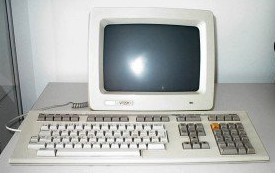
The installer prompted for a kbd map, I took the default 'us' layout.
OpenBSD even supports using a serial console with a little hanky panky. One of the things, that in my opinion was very professional and a great change. It asked me _if_ I had a backup of my data. Normally (in my exp) you only get a warning about how dangerous it can be to any data on disk (which of course OpenBSD did). We then proceeded into the partitioning phase.
It listed the available disks (wd0) and asked for the root disk. I was prompted to use all of the disk or (default) not to use the whole disk for BSD. Being a dedicated machine, I wanted the whole disk used. If you want to multi-boot or make multiple slices (primary partitions) you'll need to elect for a fdisking nightmare. Generally OpenBSD supports disks up to one Terrabyte, thats about 1,000,000 MB. Wwell, not really but close enough and easier to remember :-P. I chose to use the whole disk, so I was allowed to skip fdisk and go on to disklabel maker 9.0 pro.
I must warn ya, the fdisk/disklabel software has not advanced much in terms of interface. Since the ex(1) line editor was mans best friend. FYI, vi is a 'visual' interface to the 'extended' editor :-)
I created a group of bsd partitions in my slice, following the suggestions most of the time.
From my installed system:
One can set the offset, size, FS Type, and mount point when adding a new partition. Very lucky for me, it was smart enough to find the offset itself. I don't really like working in cylinders so I was pleased to be able to specify the size in a more friendly manor. Such as 150M for 150 Megabytes :-)
The file system type is '4.2BSD" or swap. wd0a and wd0b default to the root / partition and swap partitions respectfully. Also the wd0c refers to the _entire_ slice (primary partition). When done, I wrote the label and exited. It prompted me to confirm the mount points, kind of handy. After confirming my 5 mount points I issued a 'done'.
Yet again, it wanted me to confirm that I wanted to continue with the formating. It auto formated each partition in the label and took me to the configuration phase.
I have never seen such a simple configuration phase, all it really amounts to is setting up enough data for the machine to attach to the network, or at least use the 'hostname' command. I set the short hostname when prompted to 'vectra'. I then had a boolean problem, do I configure the network or not? Since I don't see any point in waiting till first boot or chrooting after install and doing it before first boot. I decided to set up the network settings. Be warned, the only text editor you have to work with is ed(1). I really hate ed, but its a good little editor when you think about how tight the space is on a 1.44MB boot disk.
I set up my 3Com ethernet NIC (xl0) using DHCP, when prompted and worked the following.
A very nice set up, I then used the shell and ed to take a look at my network configuration, all was right. After exiting the shell, I was ordered to set roots password. That completed the configuration phase ! Yeah thats it, all you really have to set up is enough to get a network connection and a password for root.
Not having been able to afford a disk set, when prompted for the install media (i386 supports cd, disk, ftp, and http). I took up an ftp install, electing _not_ to setup ftp/http proxy connection details. As I do not have one to worry about when doing this stuff ^_^
I installed using the ftp.openbsd.org mirror with the default package sets. Be warned it does take a little while for it to connect to the server and let you choose packages. The required are:
The other packages are: comp40, development tools (gcc, headers, libs e.t.c.), man40 (man pages), misc40 (extra docs), games40 (simple games), and a slew of x* packages required for using the X Windows System. Being intended for a SMB/NTP/Print server, I don't need an X Server eating my 8GB disk.
The system fetched and installed each package I selected from the ftp mirror and took me to the 'startup' phase. Where I could adjust settings related to what would turn on automatically at boot. Namely.
Do I want SSHD (default yes), my LAN requires this since I can't get a KVM switch.
Do I want NTPD (default no), I want vectra to be a time server for my lan.
Do I expect to run X (default no), which if yes would tune a few things to make the XxX life easier.
Should the default console be com0, *nix starts numbers at 0, so BSDs com0 is DOS/Winsucks com1 !
And a would've been nicer to ask during configuration: Time Zone setup. I elected for 'Zulu' time. I don't use local time for much, and try to use UTC when ever I can.
A little BSD Magic and vola
The manual did mention chroot'ing and doing configuration before reboot, but I found that it was unnecessary for my needs.
On reboot I had a very good working system, checked the afterboot man page, confirmed I had a solid network connection, added a regular user(s), and could SSH in from it/them.
All was well and good, but after like 10-15 mintues the system would drop off the LAN. I couldn't figure it out, but putting a KB or monitor back on it fixed it. After a poke in the BIOS the next morning. I found a very interesting option :-)
The system was set to stand by after n minutes, I tested with both standby and suspend set to 15 minutes. And sure enough after 15 minutes my SSH session would time out. And I'd have to physically type a key on the keyboard, or insert one into the port. After I cleared this, all was well ! FreeBSD never cared a rats behind but FreeBSD is not OpenBSD :-)
I had thought maybe the kernel thought there was a problem /w the default console, but I figured that'd leave some viable info or a crash. Apparently the BIOS was the problem hehe.
PC-BSD, an easy to install FreeBSD based desktop has a great GUI installer. Very easy and simple, but I think OpenBSDs was easier. Since I elect to do 'advanced' installs with PC-BSD rather then the short basics. Never the less, the effect was the same.
PC-BSD, a fully working KDE Desktop on the first boot.
OpenBSD, a fully working Console System on the first boot.
I didn't really have to configure a bloody thing after running adduser on the OpenBSD box ;-) Of course theres more work to do, but not as a case of getting a _working_ system. I find OpenBSD so far to be a great system.
http://www.openbsd.org/
The worlds most secure OS, with only two remote holes in the default install found in over 10 years. And a heck of a lot of looking !!!
With out a doubt, this is the easiest to install OS I have ever worked with. I downloaded floppy40.fs from one of the FTP Mirrors. There are 40, 40A, and 40B. For most 'Desktop', 'Server', and 'Laptop' hardware sets respectfully.
I put one of my 3.5" Stiffies in floppy disk drive #1 (/dev/fd0). Formated the disk and did a byte exact copy with the dd command.
Vectra# fdformat /dev/fd0
  Format 1440K floppy `/dev/fd0'? (y/n): y
  Processing VVVVVVVVVVVVVVVVVVVVVVVVVVVVVVVVVVVVVVVV done.
Vectra# dd if=floppy40.fs of=/dev/rfd0c bs=32k
Vectra# cmp /dev/fd0 floppy40.fs
Vectra#
As per the OpenBSD documentation I used the compare utility to make sure I had a clean disk. Gotta remember about ol'cmp(1) hehe.
I ejected the disk and labeled it, 'OpenBSD 4.0 Floppy40.fs'. Reinserted it and rebooted my computer. (After swapping monitors and keyboards).
The PC booted off the stiff disk, giving me a boot> prompt. Very sweetly I could use 'ls' to see what was on the disk, boot and bsd. Knowing that bsd was the kernel (from reading tfm) I booted it.
boot> boot bsd
Of course it will auto loaded the kernel into memory if you let it sit for a few seconds. Afterwards it asked for an install, upgrade, or shell prompt. I could have used a CD-ROM, but for just making a boot disk with an installer I felt it was kind of wasteful. Especially when Vectra is the only _personal_ computer I have /w a floppy drive. Ma's has one but she'd freak if her PC booted to a getty prompt !
The installer reminds me some what of Slackware GNU/Linux's way of asking which kernel to boot. But for the whole installer xD. I'm sorry to say that OpenBSD, while being the easiest to install OS I have _ever_ seen. Is not for the faint of heart to install !
The installer asked me for a terminal type, defaulting to vt220. I'm not really very smart about the old terminals having never used one. But the internet helps. The vt220 came with a LK201 keyboard with a layout close enough to the modern US Standard keyboard layout for my tastes. The only sad thing is that one cannot press scroll lock and page back to read stuff that flew by. At least on my system so, I'd recommend having the manual handy during partitioning.
The installer prompted for a kbd map, I took the default 'us' layout.
Welcome to the OpenBSD/i386 4.0 install program.

  This program will help you install OpenBSD in a simple and rational way. At
  any prompt except password prompts you can run a shell command by typing
  '!foo', or escape to a shell by typing '!'. Default answers are shown in []'s
  and are selected by pressing RETURN. At any time you can exit this program by
  pressing Control-C and then RETURN, but quitting during an install can leave
  your system in an inconsistent state.

  Specify terminal type: [vt220]
  kbd(8) mapping? ('L' for list) [none]
OpenBSD even supports using a serial console with a little hanky panky. One of the things, that in my opinion was very professional and a great change. It asked me _if_ I had a backup of my data. Normally (in my exp) you only get a warning about how dangerous it can be to any data on disk (which of course OpenBSD did). We then proceeded into the partitioning phase.
It listed the available disks (wd0) and asked for the root disk. I was prompted to use all of the disk or (default) not to use the whole disk for BSD. Being a dedicated machine, I wanted the whole disk used. If you want to multi-boot or make multiple slices (primary partitions) you'll need to elect for a fdisking nightmare. Generally OpenBSD supports disks up to one Terrabyte, thats about 1,000,000 MB. Wwell, not really but close enough and easier to remember :-P. I chose to use the whole disk, so I was allowed to skip fdisk and go on to disklabel maker 9.0 pro.
I must warn ya, the fdisk/disklabel software has not advanced much in terms of interface. Since the ex(1) line editor was mans best friend. FYI, vi is a 'visual' interface to the 'extended' editor :-)
I created a group of bsd partitions in my slice, following the suggestions most of the time.
From my installed system:
Terry@vectra-$ df -h
Filesystem     Size    Used   Avail Capacity  Mounted on
/dev/wd0a      147M   28.0M    112M    20%    /
/dev/wd0h      393M    628K    372M     0%    /home
/dev/wd0d     98.3M    2.0K   93.4M     0%    /tmp
/dev/wd0g      6.7G    426M    5.9G     7%    /usr
/dev/wd0e      148M    5.8M    135M     4%    /var
One can set the offset, size, FS Type, and mount point when adding a new partition. Very lucky for me, it was smart enough to find the offset itself. I don't really like working in cylinders so I was pleased to be able to specify the size in a more friendly manor. Such as 150M for 150 Megabytes :-)
The file system type is '4.2BSD" or swap. wd0a and wd0b default to the root / partition and swap partitions respectfully. Also the wd0c refers to the _entire_ slice (primary partition). When done, I wrote the label and exited. It prompted me to confirm the mount points, kind of handy. After confirming my 5 mount points I issued a 'done'.
Yet again, it wanted me to confirm that I wanted to continue with the formating. It auto formated each partition in the label and took me to the configuration phase.
I have never seen such a simple configuration phase, all it really amounts to is setting up enough data for the machine to attach to the network, or at least use the 'hostname' command. I set the short hostname when prompted to 'vectra'. I then had a boolean problem, do I configure the network or not? Since I don't see any point in waiting till first boot or chrooting after install and doing it before first boot. I decided to set up the network settings. Be warned, the only text editor you have to work with is ed(1). I really hate ed, but its a good little editor when you think about how tight the space is on a 1.44MB boot disk.
I set up my 3Com ethernet NIC (xl0) using DHCP, when prompted and worked the following.
  DNS domain name? (e.g. 'bar.com') [my.domain] my.domain
  DNS nameserver? (IP address or 'none') [my name servers] Enter
  Use the nameserver now? [yes] yeskbd>
  Default route? (IP address, 'dhcp' or 'none') [dhcp] dhcp
  Edit hosts with ed? [no] Enter
  Do you want to do any manual network configuration? [no] yes
A very nice set up, I then used the shell and ed to take a look at my network configuration, all was right. After exiting the shell, I was ordered to set roots password. That completed the configuration phase ! Yeah thats it, all you really have to set up is enough to get a network connection and a password for root.
Not having been able to afford a disk set, when prompted for the install media (i386 supports cd, disk, ftp, and http). I took up an ftp install, electing _not_ to setup ftp/http proxy connection details. As I do not have one to worry about when doing this stuff ^_^
I installed using the ftp.openbsd.org mirror with the default package sets. Be warned it does take a little while for it to connect to the server and let you choose packages. The required are:
- bsd - The Kernel
- base40.tgz - The base system (think /bin:/sbin:/usr/bin:/usr/sbin e.t.c) * bsd.mp - Multi-processor (SMP) kernel (only some platforms) * bsd.rd - RAM disk kernel
- etc40.tgz - System Configuration files (/etc)
The other packages are: comp40, development tools (gcc, headers, libs e.t.c.), man40 (man pages), misc40 (extra docs), games40 (simple games), and a slew of x* packages required for using the X Windows System. Being intended for a SMB/NTP/Print server, I don't need an X Server eating my 8GB disk.
The system fetched and installed each package I selected from the ftp mirror and took me to the 'startup' phase. Where I could adjust settings related to what would turn on automatically at boot. Namely.
Do I want SSHD (default yes), my LAN requires this since I can't get a KVM switch.
Do I want NTPD (default no), I want vectra to be a time server for my lan.
Do I expect to run X (default no), which if yes would tune a few things to make the XxX life easier.
Should the default console be com0, *nix starts numbers at 0, so BSDs com0 is DOS/Winsucks com1 !
And a would've been nicer to ask during configuration: Time Zone setup. I elected for 'Zulu' time. I don't use local time for much, and try to use UTC when ever I can.
A little BSD Magic and vola
CONGRATULATIONS! Your OpenBSD install has been successfully completed!
  To boot the new system, enter halt at the command prompt. Once the
  system has halted, reset the machine and boot from the disk.
The manual did mention chroot'ing and doing configuration before reboot, but I found that it was unnecessary for my needs.
On reboot I had a very good working system, checked the afterboot man page, confirmed I had a solid network connection, added a regular user(s), and could SSH in from it/them.
All was well and good, but after like 10-15 mintues the system would drop off the LAN. I couldn't figure it out, but putting a KB or monitor back on it fixed it. After a poke in the BIOS the next morning. I found a very interesting option :-)
The system was set to stand by after n minutes, I tested with both standby and suspend set to 15 minutes. And sure enough after 15 minutes my SSH session would time out. And I'd have to physically type a key on the keyboard, or insert one into the port. After I cleared this, all was well ! FreeBSD never cared a rats behind but FreeBSD is not OpenBSD :-)
I had thought maybe the kernel thought there was a problem /w the default console, but I figured that'd leave some viable info or a crash. Apparently the BIOS was the problem hehe.
PC-BSD, an easy to install FreeBSD based desktop has a great GUI installer. Very easy and simple, but I think OpenBSDs was easier. Since I elect to do 'advanced' installs with PC-BSD rather then the short basics. Never the less, the effect was the same.
PC-BSD, a fully working KDE Desktop on the first boot.
OpenBSD, a fully working Console System on the first boot.
I didn't really have to configure a bloody thing after running adduser on the OpenBSD box ;-) Of course theres more work to do, but not as a case of getting a _working_ system. I find OpenBSD so far to be a great system.
Subscribe to:
Posts (Atom)